 LeoVasanko
867132f26b
LeoVasanko
867132f26b
The language-switch trail ping read <html lang> before the view
transition applied the swap, so it reported the previous language (and
read pings never update trail-item languages server-side): multi-
language visits recorded as single-language trails and the analytics
flag combining had nothing to show. The switch ping now passes the
picked tag explicitly.

Language negotiation no longer prefers the article's original language
anywhere in the Accept-Language list — nearly every browser lists
English as a fallback, so translations were almost never served. The
first servable header language now wins, the original counting only in
its natural position.

Pagerite
A CMS for people who are done patching WordPress. There's no PHP or Node.js to exploit — the whole editing surface sits behind your own SSO proxy, so the server the internet can talk to just renders plain pages that search engines and social media can read too.
The articles have rich layout and don't look boxed in like with most web publishing platforms. The software is lightweight and fast enough to serve any number of visitors you have. We run our own site vasanko.com on it, in case you wish to have a quick look.
Run it
uvx pagerite localhost
That serves a demo site on localhost using uv. When you take it to production, pass your domain name instead. Our setup guide walks through the whole production arrangement. Read it before running this online.
What it's like
You write, Pagerite renders. Articles are Markdown with the extensions that matter — tables, footnotes, task lists, callouts, highlighted code, aside boxes — and raw HTML goes through untouched when Markdown runs out. Long articles reflow into a proper two-column composition on wide screens without you doing anything.
Editing happens on the page. Click the pen next to a heading and an editor docks beside the live article, previewing server-side as you type. Site name, theme, fonts, banner, custom CSS — changed in a panel, applied immediately. New pages grow from a ➕ in the structure tree; drag or rename rows to reorder your whole navigational hierarchy. Entirely custom or premade top banner designs per category or page are available, animations included.
Full scripting and styling is available for editors who wish to implement more complex functionality on their articles. This also means you should only let trusted users write on your site: this is by no means a public blog platform.
The worst case scenario when a hacker gains access to your admin accounts (say if you didn't read the setup guide): they can take over the entire site and run scripts on users' browsers, but the damage is limited to same domain. All your articles can be restored to the state prior to that hack or that one user's edits undone, and no data is irrecoverably lost. This is much better than other platforms that also let hackers run code on your server (WordPress).
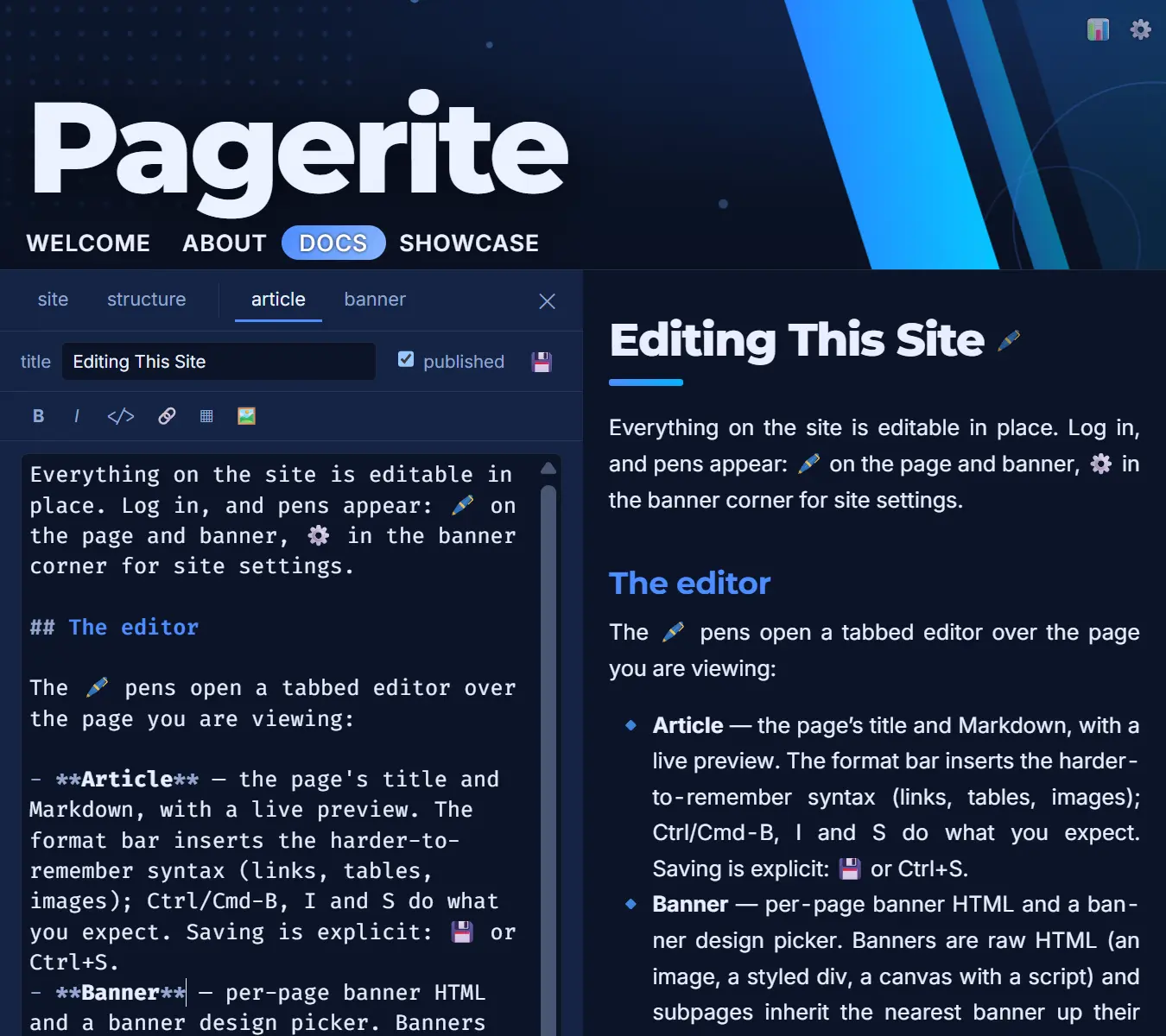
Theme just every part to your liking. Themes, banner designs and page transitions are included — pick one from the site editor or copy a folder and make it yours. Several high quality fonts are included among with other assets: your site never phones a third party or us for anything. And if after all you need to customize, additional site and banner code may be provided by the admin panel.
Search engines and social cards come free. Every page gets a proper description, canonical link and Open Graph/Twitter card metadata derived from the article — including a share image picked from your own figures — without a single "SEO plugin". Category index pages, if you wish to have those, also get their sub pages shown automatically in card format.
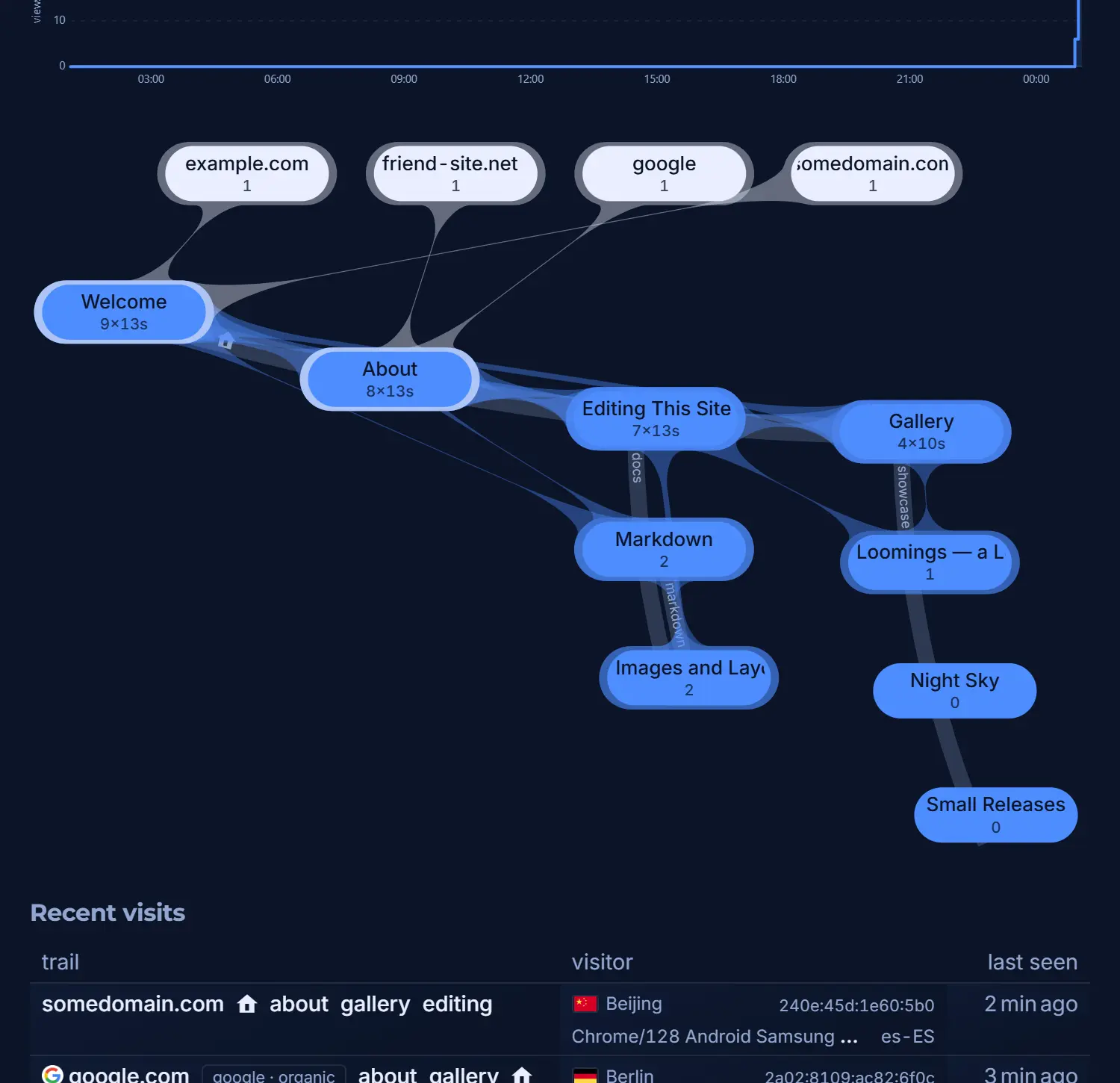 You can see your readers. Built-in analytics need no cookies and no third-party tracker: visits, referers, reading time and a live map of how people move between your pages, plus separate ledgers for crawlers and the abusers probing for wordpress PHP files — who are, of course, wasting their time here.